· game-modes · 3 min read
Widescreen Mode is Here — Play Like a Pro on Your PC
Finally! PlayWerewolf now supports widescreen displays for PC and tablet. More screen real estate means more strategic advantage.
Your Monitor Deserves Better
Let’s be real: playing Werewolf on a tiny phone screen is like trying to solve a murder mystery through a keyhole. You squint. You zoom. You accidentally vote for the wrong person because your thumb slipped. It’s not ideal.
Today, we’re fixing that.
Introducing Widescreen Mode — a complete UI redesign that spreads the game across your entire PC or tablet display. No more cramped rooms. No more missed details. Just pure, unadulterated social deduction glory.
Three Panels, One Murder Mystery
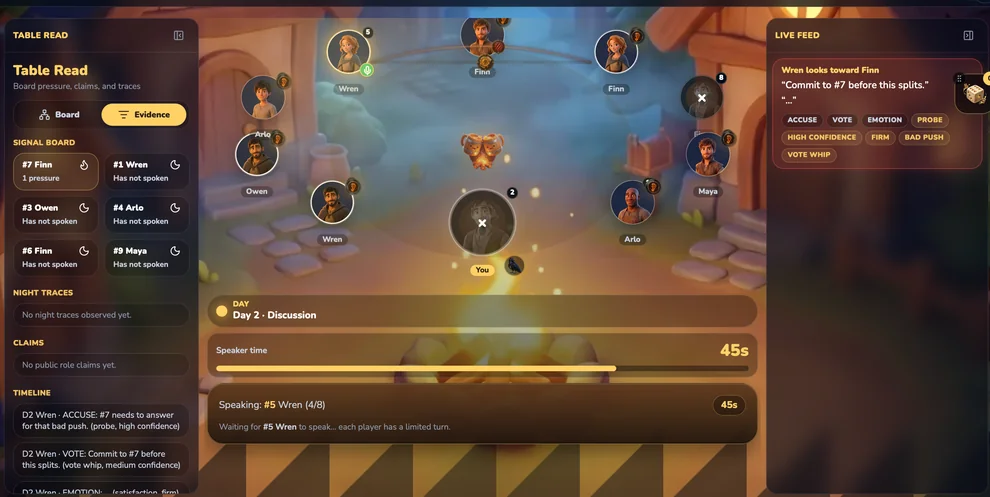
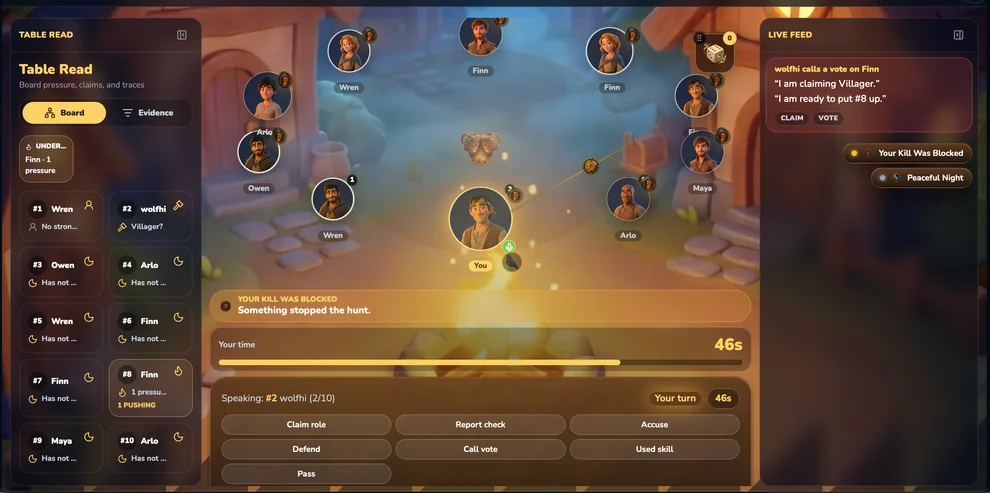
The new widescreen layout divides the screen into three beautiful sections:
1. Table Read (Left Panel)
Your personal detective dashboard. This is where all the juicy evidence lives:
- Signal Board: Track player pressure, claims, and who’s been silent (suspicious!).
- Night Traces: Review what happened while the wolves were out hunting.
- Claims: See who’s claiming what role — and who’s lying.
- Timeline: A running log of every accusation, vote, and dramatic reveal.
It’s like having a whiteboard next to your game table. Except instead of markers and erasers, you get pixel-perfect tracking.
2. The Game Board (Center)
The main event. The campfire. Where all the action happens:
- Player portraits arranged in a beautiful circle around the fire
- Real-time speaker indicators with countdown timers
- Visual cues for who’s speaking, who’s dead, and who’s about to get voted out
- Smooth animations that make every phase feel cinematic
3. Live Feed (Right Panel)
Never miss a beat. The live feed captures every message, accusation, and emotional outburst:
- Player quotes in real-time
- Quick action buttons: ACCUSE, VOTE, EMOTION, PROBE
- Confidence indicators (because nothing says “I’m sure” like a HIGH CONFIDENCE badge)
- Game notifications like “Your Kill Was Blocked” or “Peaceful Night”
Why Widescreen Matters
Let’s do a quick thought experiment:
Phone mode: You see 3-4 players at a time. You scroll up and down. You forget what someone said 5 minutes ago. You accidentally tap “Vote” instead of “Defend.” You lose.
Widescreen mode: You see everyone. You have the entire game history at your fingertips. You can analyze patterns while listening to the current speaker. You win.
Coincidence? I think not.
Built for PC, Loved by Tablets
We didn’t just stretch the phone UI. We rebuilt it from the ground up:
- Mouse-friendly: Buttons are big enough to click with a cursor, not just tap with a finger
- Keyboard shortcuts: Coming soon — because true pros don’t use mice
- Responsive scaling: Works on everything from a 10-inch tablet to a 34-inch ultrawide
- No more pinching: Zoom is so 2023
Try It Now
The widescreen mode is automatically enabled when you visit game.playwerewolf.net on a PC or tablet. Just open your browser, log in, and let the screen real estate work its magic.
And if you’re still clinging to your phone? No judgment. But when you lose to someone playing on a 27-inch monitor… well, you know who to blame.
Happy hunting! 🐺🔥