· PlayWerewolf Team · strategy · 2 min read
Social Guide — Friends, Chat & Invites
The social layer connects you with other players. Add friends, send emoji stickers, track their presence, and invite new players to the game.
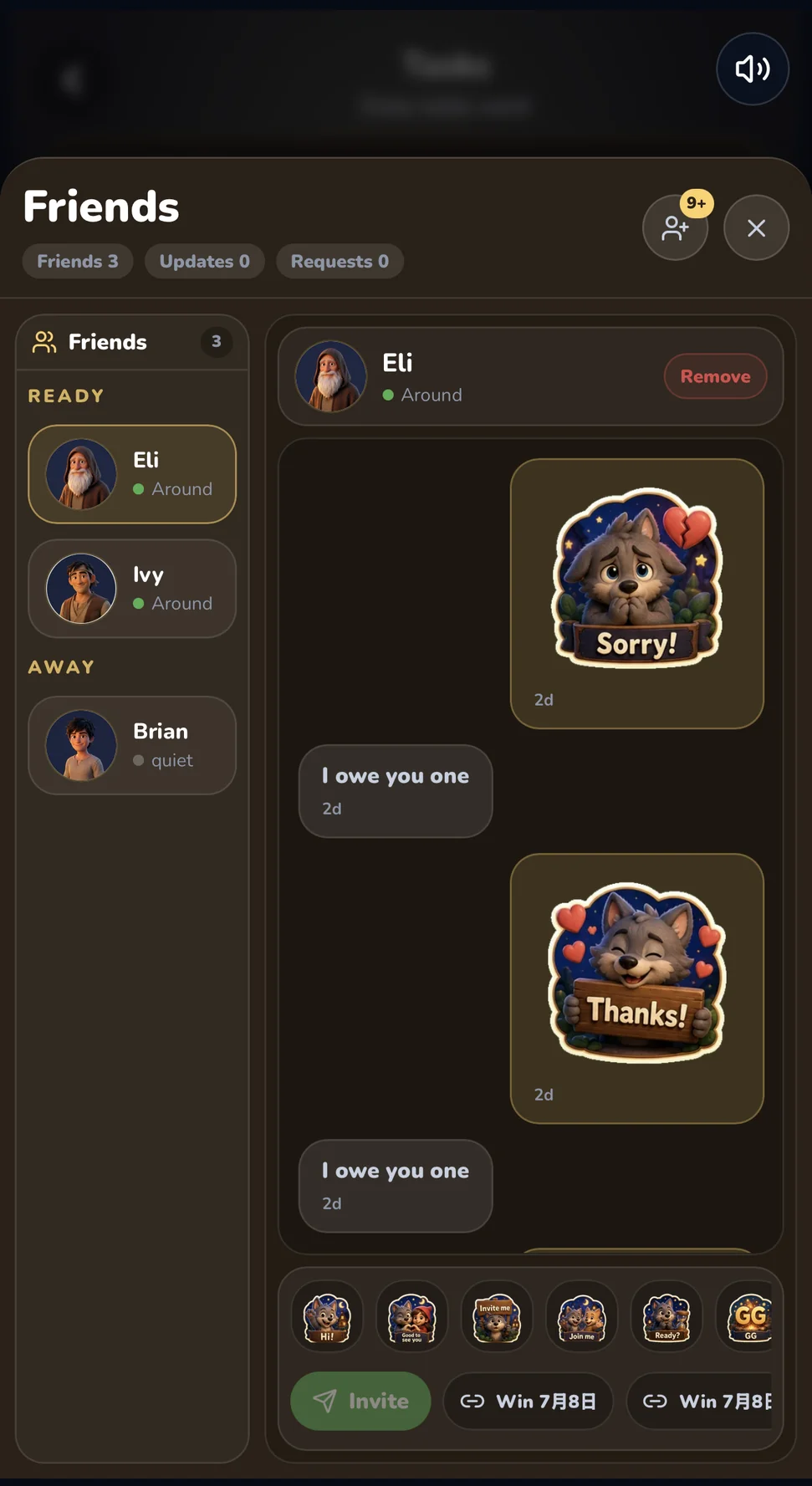
Werewolf is better with people you know. The Friends Drawer (accessible from the bottom navigation bar) gives you a full social toolkit: friend list, real-time chat, presence tracking, and registration invites.
Adding Friends
Send a friend request to any player. You are limited to 20 outgoing requests per day to prevent spam. Once accepted, you can label your friends for easy reference:
- Favorite — Your go-to playing partners
- Rival — That player you always suspect
- Trusted — Reliable allies
- Chaos — The wild cards
Presence Tracking
The friend list shows real-time status:
| Status | Meaning |
|---|---|
| Available | Online and free to play |
| At Table | In a room lobby, waiting to start |
| In Match | Currently in a game |
| Away | Idle for a while |
| Offline | Not connected |
| Hidden | Appears offline to everyone |
If a friend is in a room or match, a room hint shows the mode, player count, and whether the room is joinable. You can jump straight into their game from the friend list.
The presence system uses PresenceDO — a Durable Object that tracks multi-session states (you can be logged in on web and game simultaneously). Status transitions: fresh (90s) → away (10 min) → cleanup (15 min). When friends come online or change status, you get a FRIEND_PRESENCE_CHANGED push notification.
Chat & Quick Messages
Real-time chat uses push envelopes through the Presence system. You can send:
- Quick Messages — 16 preset texts like “gg”, “nice_read”, “run_it_back”, “revenge”, “invite_me”, “well_played”
- Emoji Stickers — 16 first-party WebP stickers: hi, invite_me, join_me, ready, gg, well_played, nice_one, thanks, sorry, lol, wow, cheers, again, watch_this, missed_you
Messages are rate-limited to keep chat civil.
Friend Invites
Want to bring a new player into the game? Create a registration invite code from the friends drawer. Each invite:
- Has a 30-day TTL
- Allows up to 50 redemptions (so one code can be shared with a group)
- Is shareable as a short code or link
Invite notifications appear in your friend list with read/unread/dismissed states.
Seed Following
Beyond real friends, you can follow seed players — human-curated AI-like profiles with distinct personalities. Each seed has tags:
- Favorite — Seeds you enjoy playing alongside
- Nemesis — Seeds that always catch you
- Funny — Seeds with memorable dialogue
Followed seeds get prioritized matchmaking — you are more likely to land in rooms with seeds you follow.
Removing Friends
Remove friends from the same drawer. There is no drama — just a button.
The social layer is designed to make every session feel like a gathering of familiar faces, even when your actual friends are offline.
Open the game and add your first friend.